Invite-only alpha · alpha-2026-10-03
Sign in with Dash · mainnet
Your identity. Your approval.
Use SIWD to approve website logins from your Android phone. The authenticator signs a short-lived login request; it does not send your recovery phrase to the website.
Get the right Android app
This site uses mainnet. Testnet and mainnet identities are separate, so install the matching app.
A prebuilt APK has not been published on this deployment. Use the source and build instructions below, or ask your site operator for a signed build.
Experimental mainnet build. SIWD is still under development and has not completed its public-mainnet security review. Installing the app does not create a Dash identity or register a name.
The app is distributed directly while app-store availability is being arranged. If you can review the source and build tools, reviewing and building it yourself gives you more control over what you install. Compiling alone is not a security audit.
Set up once, then approve when you sign in.
Install on your phone
Download the APK above and open it. Android may ask you to allow this browser or file manager to install unknown apps. Allow that source if you trust it, finish installing, then turn that permission off again. Keep Android's security scanning enabled. Android installation help.
Import your existing Dash identity
Open the matching mainnet app and import your recovery details there. Your Dash name is an optional discovery shortcut. Keep your recovery backup safe and never paste it into this website or send it to a GM. The app needs device authentication to approve a login.
Connect your site account
If you are new, open your GM's invite and create your account first. Log in with your password or passkey, open Account, and connect your Dash name by approving the request in SIWD.
Approve a login
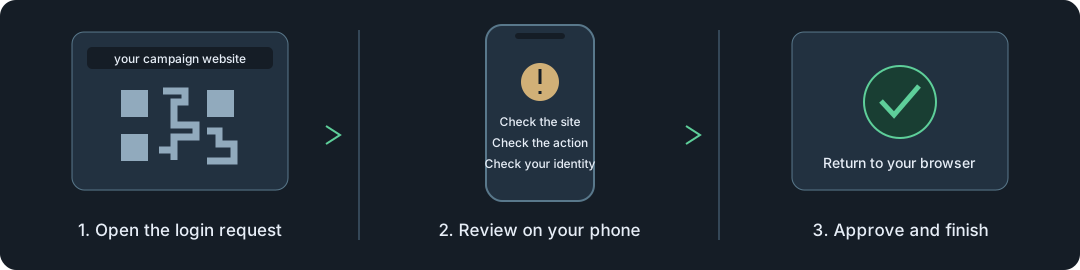
Choose Sign in with Dash and enter your linked name. On the same phone, tap Open Android app. From another device, scan the QR using the authenticator. Check the website, action and identity in the app, approve, then return to the browser to finish.
If the app does not open
Your browser may ask permission to open external apps. You can also scan the QR from inside the authenticator or copy the request link into it. If the request expires, start a fresh login. Only share a recovery phrase with the trusted authenticator's import screen, never with a login page.
For updates from this publisher, install the new APK over the existing app to preserve your stored identities. A build signed with a different key may require a separate installation; keep your recovery backup before changing builds.